ファイル検索エンジン
このアプリケーションは、GUIの応答性を維持するために、スレッドとキューを使用して
I/Oタスクを管理するローカルファイル検索エンジンです。Treeviewは
検索結果をリアルタイムで更新し、検索結果のTreeview内で
最も新しく追加された結果にフォーカスと表示を合わせます。
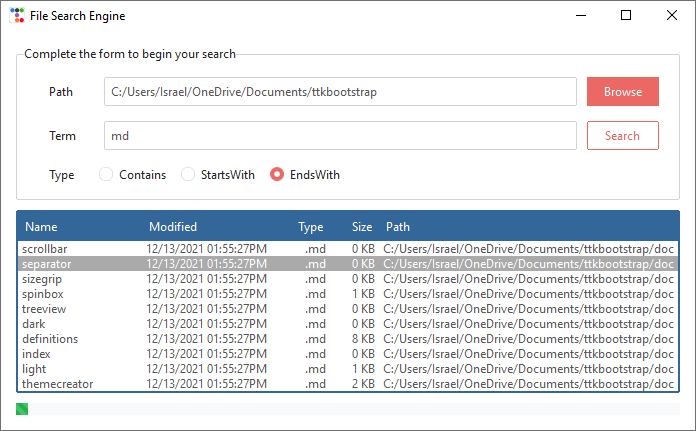
スタイルの概要
この例で使用されているテーマは journal です。
| 項目 | クラス | ブートスタイル |
|---|---|---|
| ユーザー入力 | Entry |
default |
| 参照 | Button |
primary |
| 検索 | Button |
primary-outline |
| Treeview | Treeview |
info |
| プログレスバー | Progressbar |
success |
サンプルコード
import datetime
import pathlib
from queue import Queue
from threading import Thread
from tkinter.filedialog import askdirectory
import ttkbootstrap as ttk
from ttkbootstrap.constants import *
from ttkbootstrap import utility


class FileSearchEngine(ttk.Frame):

    queue = Queue()
    searching = False

    def __init__(self, master):
        super().__init__(master, padding=15)
        self.pack(fill=BOTH, expand=YES)

        # アプリケーション変数
        _path = pathlib.Path().absolute().as_posix()
        self.path_var = ttk.StringVar(value=_path)
        self.term_var = ttk.StringVar(value='md')
        self.type_var = ttk.StringVar(value='endswidth')

        # ヘッダーおよびラベルフレームのオプションコンテナ
        option_text = "検索を開始するには、フォームに入力してください"
        self.option_lf = ttk.Labelframe(self, text=option_text, padding=15)
        self.option_lf.pack(fill=X, expand=YES, anchor=N)

        self.create_path_row()
        self.create_term_row()
        self.create_type_row()
        self.create_results_view()

        self.progressbar = ttk.Progressbar(
            master=self,
            mode=INDETERMINATE,
            bootstyle=(STRIPED, SUCCESS)
        )
        self.progressbar.pack(fill=X, expand=YES)

    def create_path_row(self):
        """ラベルフレームにパス行を追加する"""
        path_row = ttk.Frame(self.option_lf)
        path_row.pack(fill=X, expand=YES)
        path_lbl = ttk.Label(path_row, text="Path", width=8)
        path_lbl.pack(side=LEFT, padx=(15, 0))
        path_ent = ttk.Entry(path_row, textvariable=self.path_var)
        path_ent.pack(side=LEFT, fill=X, expand=YES, padx=5)
        browse_btn = ttk.Button(
            master=path_row,
            text="Browse",
            command=self.on_browse,
            width=8
        )
        browse_btn.pack(side=LEFT, padx=5)

    def create_term_row(self):
        """ラベルフレームに用語行を追加する"""
        term_row = ttk.Frame(self.option_lf)
        term_row.pack(fill=X, expand=YES, pady=15)
        term_lbl = ttk.Label(term_row, text="Term", width=8)
        term_lbl.pack(side=LEFT, padx=(15, 0))
        term_ent = ttk.Entry(term_row, textvariable=self.term_var)
        term_ent.pack(side=LEFT, fill=X, expand=YES, padx=5)
        search_btn = ttk.Button(
            master=term_row,
            text="検索",
            command=self.on_search,
            bootstyle=OUTLINE,
            width=8
        )
        search_btn.pack(side=LEFT, padx=5)

    def create_type_row(self):
        """ラベルフレームにタイプ行を追加する"""
        type_row = ttk.Frame(self.option_lf)
        type_row.pack(fill=X, expand=YES)
        type_lbl = ttk.Label(type_row, text="Type", width=8)
        type_lbl.pack(side=LEFT, padx=(15, 0))

        contains_opt = ttk.Radiobutton(
            master=type_row,
            text="Contains",
            variable=self.type_var,
            value="contains"
        )
        contains_opt.pack(side=LEFT)

        startswith_opt = ttk.Radiobutton(
            master=type_row,
            text="StartsWith",
            variable=self.type_var,
            value="startswith"
        )
        startswith_opt.pack(side=LEFT, padx=15)

        endswith_opt = ttk.Radiobutton(
            master=type_row,
            text="EndsWith",
            variable=self.type_var,
            value="endswith"
        )
        endswith_opt.pack(side=LEFT)
        endswith_opt.invoke()

    def create_results_view(self):
        """結果ツリービューをラベルフレームに追加する"""
        self.resultview = ttk.Treeview(
            master=self,
            bootstyle=INFO,
            columns=[0, 1, 2, 3, 4],
            show=HEADINGS
        )
        self.resultview.pack(fill=BOTH, expand=YES, pady=10)

        # 列の設定と、`scale_size` を使用して解像度に合わせて調整
        self.resultview.heading(0, text='Name', anchor=W)
        self.resultview.heading(1, text='Modified', anchor=W)
        self.resultview.heading(2, text='Type', anchor=E)
        self.resultview.heading(3, text='Size', anchor=E)
        self.resultview.heading(4, text='Path', anchor=W)
        self.resultview.column(
            column=0,
            anchor=W,
            width=utility.scale_size(self, 125),
            stretch=False
        )
        self.resultview.column(
            column=1,
            anchor=W,
            width=utility.scale_size(self, 140),
            stretch=False
        )
        self.resultview.column(
            column=2,
            anchor=E,
            width=utility.scale_size(self, 50),
            stretch=False
        )
        self.resultview.column(
            column=3,
            anchor=E,
            width=utility.scale_size(self, 50),
            stretch=False
        )
        self.resultview.column(
            column=4,
            anchor=W,
            width=utility.scale_size(self, 300)
        )

    def on_browse(self):
        """ディレクトリ閲覧時のコールバック"""
        path = askdirectory(title="ディレクトリを閲覧")
        if path:
            self.path_var.set(path)

    def on_search(self):
        """検索タイプに基づいて用語を検索する"""
        search_term = self.term_var.get()
        search_path = self.path_var.get()
        search_type = self.type_var.get()

        if search_term == '':
            return

        # UIのロックを防ぐため、別のスレッドで検索を開始
        Thread(
            target=FileSearchEngine.file_search,
            args=(search_term, search_path, search_type),
            daemon=True
        ).start()
        self.progressbar.start(10)

        iid = self.resultview.insert(
            parent='',
            index=END,
        )
        self.resultview.item(iid, open=True)
        self.after(100, lambda: self.check_queue(iid))

    def check_queue(self, iid):
        """ファイルキューを確認し、空でない場合は結果を出力する"""
        if all([
            FileSearchEngine.searching,
            not FileSearchEngine.queue.empty()
        ]):
            filename = FileSearchEngine.queue.get()
            self.insert_row(filename, iid)
            self.update_idletasks()
            self.after(100, lambda: self.check_queue(iid))
        elif all([
            FileSearchEngine.searching ではない,
            FileSearchEngine.queue.empty() ではない
        ]):
            while FileSearchEngine.queue.empty() ではない:
                filename = FileSearchEngine.queue.get()
                self.insert_row(filename, iid)
            self.update_idletasks()
            self.progressbar.stop()
        elif all([
            FileSearchEngine.searching,
            FileSearchEngine.queue.empty()
        ]):
            self.after(100, lambda: self.check_queue(iid))
        else:
            self.progressbar.stop()

    def insert_row(self, file, iid):
        """ツリー検索結果に新しい行を挿入する"""
        try:
            _stats = file.stat()
            _name = file.stem
            _timestamp = datetime.datetime.fromtimestamp(_stats.st_mtime)
            _modified = _timestamp.strftime(r'%m/%d/%Y %I:%M:%S%p')
            _type = file.suffix.lower()
            _size = FileSearchEngine.convert_size(_stats.st_size)
            _path = file.as_posix()
            iid = self.resultview.insert(
                parent='',
                index=END,
                values=(_name, _modified, _type, _size, _path)
            )
            self.resultview.selection_set(iid)
            self.resultview.see(iid)
        except OSError:
            return

    @staticmethod
    def file_search(term, search_path, search_type):
        """ディレクトリ内を再帰的に検索し、一致するファイルを探す"""
        FileSearchEngine.set_searching(1)
        if search_type == 'contains':
            FileSearchEngine.find_contains(term, search_path)
        elif search_type == 'startswith':
            FileSearchEngine.find_startswith(term, search_path)
        elif search_type == 'endswith':
            FileSearchEngine.find_endswith(term, search_path)

    @staticmethod
    def find_contains(term, search_path):
        """検索語を含むすべてのファイルを検索する"""
        for path, _, files in pathlib.os.walk(search_path):
            if files:
                for file in files:
                    if term in file:
                        record = pathlib.Path(path) / file
                        FileSearchEngine.queue.put(record)
        FileSearchEngine.set_searching(False)

    @staticmethod
    def find_startswith(term, search_path):
        """検索語で始まるすべてのファイルを検索する"""
        for path, _, files in pathlib.os.walk(search_path):
            if files:
                for file in files:
                    if file.startswith(term):
                        record = pathlib.Path(path) / file
                        FileSearchEngine.queue.put(record)
        FileSearchEngine.set_searching(False)

    @staticmethod
    def find_endswith(term, search_path):
        """検索語で終わるすべてのファイルを検索する"""
        for path, _, files in pathlib.os.walk(search_path):
            if files:
                for file in files:
                    if file.endswith(term):
                        record = pathlib.Path(path) / file
                        FileSearchEngine.queue.put(record)
        FileSearchEngine.set_searching(False)

    @staticmethod
    def set_searching(state=False):
        """検索ステータスを設定する"""
        FileSearchEngine.searching = state

    @staticmethod
    def convert_size(size):
        """スケールに応じてバイトをMBまたはKBに変換する"""
        kb = size // 1000
        mb = round(kb / 1000, 1)
        if kb > 1000:
            return f'{mb:,.1f} MB'
        else:
            return f'{kb:,d} KB'


if __name__ == '__main__':

    app = ttk.Window("File Search Engine", "journal")
    FileSearchEngine(app)
    app.mainloop()