

LabeledScale#
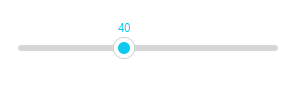
A labeled scale is a Scale with a value label that rides along
the handle, so the user sees the exact number they are setting. LabeledScale
is a ttkbootstrap widget (a real class with its own API, imported as
ttk.LabeledScale). This page covers building one, where the label sits, then
the bootstyle color.
Usage#
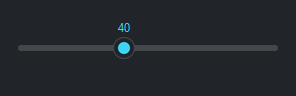
Set the range with from_ and to and bind a variable — the label shows the
variable’s value and follows the handle as it moves:
import ttkbootstrap as ttk
from ttkbootstrap.widgets import LabeledScale

app = ttk.App()

level = ttk.IntVar(value=40)
LabeledScale(app, variable=level, from_=0, to=100, bootstyle="info").pack(fill="x", padx=20, pady=20)

ttk.Button(app, text="Apply", command=lambda: print(level.get()), bootstyle="primary").pack()

app.mainloop()
Read the chosen value from the bound variable’s .get(). The label renders the
value cleanly — it drops a trailing .0 (so 4.0 shows as 4) but keeps a
real fraction (3.7 shows as 3.7).
The widget exposes its parts as ls.scale and ls.label for fine-tuning, and
its value property reads or sets the current number directly. A
LabeledScale is horizontal only — there is no orient:
ls = LabeledScale(app, variable=level, from_=0, to=100)
ls.pack(fill="x")
ls.scale.configure(length=240)       # reach the underlying Scale
print(ls.value)                       # read the current number directly
Where the label sits#
compound places the value label above ("top", the default) or below
("bottom") the scale — those are the only two positions:
LabeledScale(app, variable=level, from_=0, to=100, compound="bottom")
Color#
bootstyle colors the handle and the filled track from the semantic palette:
LabeledScale(app, variable=level, from_=0, to=100, bootstyle="success")
Reference#
LabeledScale API reference — every option and method.
See also
Scale — the plain slider it builds on.