

DateEntry#
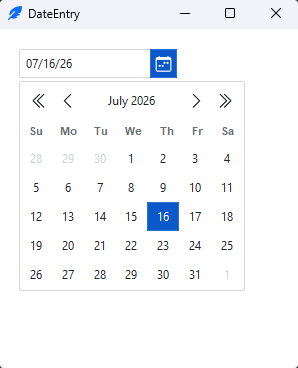
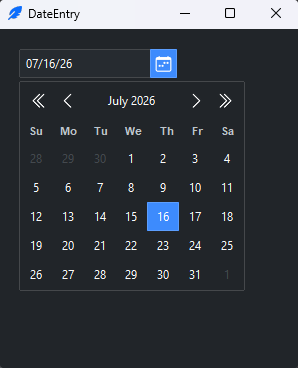
A date entry is a text field with a calendar button — the user types a date or
picks one from a pop-up calendar. DateEntry is a ttkbootstrap widget (a real
class with its own API, imported as ttk.DateEntry). This page covers reading
and setting the date, the format and calendar options, then the bootstyle
color.
Usage#
Create a DateEntry and read the chosen date with get_date() — it returns a
datetime. set_date() puts one in:
import ttkbootstrap as ttk
from ttkbootstrap.widgets import DateEntry
from datetime import datetime

app = ttk.App()

picker = DateEntry(app)
picker.pack(padx=10, pady=10)

def use_date():
    print(picker.get_date())          # -> a datetime

ttk.Button(app, text="Use date", command=use_date, bootstyle="primary").pack()

picker.set_date(datetime(2025, 6, 1)) # preselect

app.mainloop()
The widget exposes its parts as picker.entry (the text field) and
picker.button (the calendar button), and enable() / disable() toggle
interaction. The value property is a shorthand for get/set.
get_date() parses the live entry text, so typed keyboard edits are honored,
and an unparseable entry is flagged invalid when the field loses focus.
Whether an empty field can return None depends on how you create the widget:
Default (
valueomitted) — the field starts on today’s date, and an empty or unparseable field falls back to the last date set.get_date()never returnsNone. Deleting the text by hand does not produceNone— it still falls back. Use a nullable field (below) for an optional date.Nullable (
value=None) — the field can be genuinely empty, andget_date()/valuereturnNonewhile it is.
Empty and clearable#
For an optional date — a form field that starts blank — pass value=None. The
field is then empty until a date is chosen. clear() (or set_date(None))
empties it again:
picker = DateEntry(app, value=None)   # starts empty

picker.get_date()                     # -> None
picker.set_date(datetime(2025, 6, 1)) # select a date
picker.clear()                        # back to empty; get_date() -> None
An empty field is valid (not flagged invalid), and cancelling the pop-up leaves
the field empty rather than filling in a date. This matches the Querybox.get_date
dialog, which also returns None on cancel.
clear() and set_date(None) also switch a default field to the nullable model,
so after clearing it, get_date() returns None until the next date is set.
To run code when the user picks from the calendar, bind <<DateEntrySelected>>:
picker.bind("<<DateEntrySelected>>", lambda event: print(picker.get_date()))
Format and calendar#
date_format is a strftime pattern for how the date reads in the field;
start_date is the date the widget starts on; first_weekday sets the
leftmost column (0 = Monday … 6 = Sunday):
DateEntry(app, date_format="%Y-%m-%d", start_date=datetime(2025, 1, 1), first_weekday=6)
start_date is the date the calendar pop-up focuses on when no date is selected.
When value is omitted it also fills the field at construction and is the date
get_date() falls back to for an empty field; with value=None the field
starts empty and start_date positions only the calendar. Reconfiguring
start_date later moves only the pop-up focus — it does not change the displayed
date.
show_outside_days=False hides the adjacent-month days the calendar uses to pad
the first and last weeks.
Color#
bootstyle colors the entry border and the calendar accents from the semantic
palette:
DateEntry(app, bootstyle="success")
Reference#
DateEntry API reference — every option and method.
See also
Dialogs guide — the date picker dialog (
Querybox.get_date) for asking a date without a permanent field.Entry — a plain single-line text field.