Skip to content

ColorDropperDialog

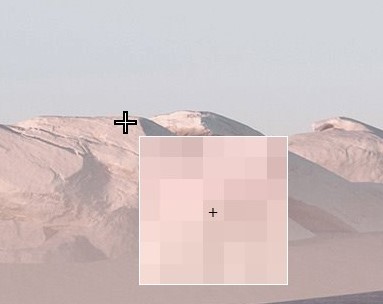
A widget that displays an indicator and a zoom window for selecting a color on the screen.

Left-click the mouse button to select a color. The result is stored in the result property as a ColorChoice tuple which contains named fields for rgb, hsl, and hex color models.

Zoom in and out on the zoom window by using the mouse wheel.

This widget is implemented for Windows and Linux only.
high resolution displays

This widget may not function properly on high resolution displays if you are not using the application in high resolution mode. This is enabled automatically on Windows.

Source code in src/ttkbootstrap/dialogs/colordropper.py
 58
 59
 60
 61
 62
 63
 64
 65
 66
 67
 68
 69
 70
 71
 72
 73
 74
 75
 76
 77
 78
 79
 80
 81
 82
 83
 84
 85
 86
 87
 88
 89
 90
 91
 92
 93
 94
 95
 96
 97
 98
 99
100
101
102
103
104
105
106
107
108
109
110
111
112
113
114
115
116
117
118
119
120
121
122
123
124
125
126
127
128
129
130
131
132
133
134
135
136
137
138
139
140
141
142
143
144
145
146
147
148
149
150
151
152
153
154
155
156
157
158
159
160
161
162
163
164
165
166
167
168
169
170
171
172
173
174
175
176
177
178
179
180
181
182
183
184
185
186
187
188
189
190
191
192
193
194
195
196
197
198
199
200
201
202
203
204
205
206
207
208
209
210
211
212
213
214
215
216
class ColorDropperDialog:
    """A widget that displays an indicator and a zoom window for
    selecting a color on the screen.

    Left-click the mouse button to select a color. The result is 
    stored in the `result` property as a `ColorChoice` tuple which
    contains named fields for rgb, hsl, and hex color models.

    Zoom in and out on the zoom window by using the mouse wheel.

    This widget is implemented for **Windows** and **Linux** only.

    ![](../../assets/dialogs/color-dropper.png)       

    !!! warning "high resolution displays"
        This widget may not function properly on high resolution
        displays if you are not using the application in high
        resolution mode. This is enabled automatically on Windows.
    """

    def __init__(self) -> None:
        self.toplevel: Optional[ttk.Toplevel] = None
        self.result: ttk.Variable = ttk.Variable()

    def build_screenshot_canvas(self) -> None:
        """Build the screenshot canvas"""
        self.screenshot_canvas: ttk.Canvas = ttk.Canvas(
            self.toplevel, cursor='tcross', autostyle=False)
        self.screenshot_data = ImageGrab.grab()
        self.screenshot_image: ImageTk.PhotoImage = ImageTk.PhotoImage(self.screenshot_data)
        self.screenshot_canvas.create_image(
            0, 0, image=self.screenshot_image, anchor=NW)
        self.screenshot_canvas.pack(fill=BOTH, expand=YES)

    def build_zoom_toplevel(self, master: tk.Misc) -> None:
        """Build the toplevel widget that shows the zoomed version of
        the pixels underneath the mouse cursor."""
        height = utility.scale_size(self.toplevel, 100)
        width = utility.scale_size(self.toplevel, 100)
        text_xoffset = utility.scale_size(self.toplevel, 50)
        text_yoffset = utility.scale_size(self.toplevel, 50)
        toplevel = ttk.Toplevel(master=master)
        toplevel.transient(master=master)
        if self.toplevel and self.toplevel.winsys == 'x11':
            toplevel.attributes('-type', 'tooltip')
        else:
            toplevel.overrideredirect(True)
        toplevel.geometry(f'{width}x{height}')
        toplevel.lift()
        self.zoom_canvas: ttk.Canvas = ttk.Canvas(
            toplevel, borderwidth=1, height=self.zoom_height, width=self.zoom_width)
        self.zoom_canvas.create_image(0, 0, tags=['image'], anchor=NW)
        self.zoom_canvas.create_text(
            text_xoffset, text_yoffset, text="+", fill="white", tags=['indicator'])
        self.zoom_canvas.pack(fill=BOTH, expand=YES)
        self.zoom_toplevel = toplevel

    def on_mouse_wheel(self, event: tk.Event) -> None:
        """Zoom in and out on the image underneath the mouse
        TODO Cross platform testing needed
        """
        if self.toplevel and self.toplevel.winsys.lower() == 'win32':
            delta = -int(event.delta / 120)
        elif self.toplevel and self.toplevel.winsys.lower() == 'aqua':
            delta = -event.delta
        elif event.num == 4:
            delta = -1
        elif event.num == 5:
            delta = 1
        self.zoom_level += delta
        self.on_mouse_motion()

    def on_left_click(self, _: tk.Event) -> Optional[ColorChoice]:
        """Capture the color underneath the mouse cursor and destroy
        the toplevel widget"""
        # add logic here to capture the image color
        hx = self.get_hover_color()
        hsl = colorutils.color_to_hsl(hx)
        rgb = colorutils.color_to_rgb(hx)
        self.result.set(ColorChoice(rgb, hsl, hx))
        if self.toplevel:
            self.toplevel.destroy()
            self.toplevel.grab_release()
        if self.zoom_toplevel:
            self.zoom_toplevel.destroy()
        return self.result.get()

    def on_right_click(self, _: tk.Event) -> None:
        """Close the color dropper without saving any color information"""
        if self.zoom_toplevel:
            self.zoom_toplevel.destroy()
        if self.toplevel:
            self.toplevel.grab_release()
            self.toplevel.destroy()

    def on_mouse_motion(self, event: Optional[tk.Event] = None) -> None:
        """Callback for mouse motion"""
        if event is None:
            x, y = self.toplevel.winfo_pointerxy()  # type: ignore[union-attr]
        else:
            x = event.x
            y = event.y
        # move snip window
        self.zoom_toplevel.geometry(
            f'+{x + self.zoom_xoffset}+{y + self.zoom_yoffset}')
        # update the snip image
        bbox = (x - self.zoom_level, y - self.zoom_level,
                x + self.zoom_level + 1, y + self.zoom_level + 1)
        size = (self.zoom_width, self.zoom_height)
        self.zoom_data = self.screenshot_data.crop(
            bbox).resize(size, Resampling.BOX)
        self.zoom_image: ImageTk.PhotoImage = ImageTk.PhotoImage(self.zoom_data)
        self.zoom_canvas.itemconfig('image', image=self.zoom_image)
        hover_color = self.get_hover_color()
        contrast_color = colorutils.contrast_color(hover_color, 'hex')
        self.zoom_canvas.itemconfig('indicator', fill=contrast_color)

    def get_hover_color(self) -> str:
        """Get the color that is hovered over by the mouse cursor."""
        x1, y1, x2, y2 = self.zoom_canvas.bbox('indicator')
        x = x1 + (x2 - x1) // 2
        y = y1 + (y2 - y2) // 2
        r, g, b = self.zoom_data.getpixel((x, y))
        hx = colorutils.color_to_hex((r, g, b))
        return hx

    def show(self) -> None:
        """Show the toplevel window"""
        self.toplevel = ttk.Toplevel(alpha=1)
        self.toplevel.wm_attributes('-fullscreen', True)
        self.build_screenshot_canvas()

        # event binding
        self.toplevel.bind("<Motion>", self.on_mouse_motion, "+")
        self.toplevel.bind("<Button-1>", self.on_left_click, "+")
        self.toplevel.bind("<Button-3>", self.on_right_click, "+")

        if self.toplevel.winsys.lower() == 'x11':
            self.toplevel.bind("<Button-4>", self.on_mouse_wheel, "+")
            self.toplevel.bind("<Button-5>", self.on_mouse_wheel, "+")
        else:
            self.toplevel.bind("<MouseWheel>", self.on_mouse_wheel, "+")

        # initial snip setup
        self.zoom_level: int = 2
        self.zoom_toplevel: Optional[ttk.Toplevel] = None
        self.zoom_data: Any = None
        self.zoom_image: Optional[ImageTk.PhotoImage] = None
        self.zoom_height: int = utility.scale_size(self.toplevel, 100)
        self.zoom_width: int = utility.scale_size(self.toplevel, 100)
        self.zoom_xoffset: int = utility.scale_size(self.toplevel, 10)
        self.zoom_yoffset: int = utility.scale_size(self.toplevel, 10)

        self.build_zoom_toplevel(self.toplevel)
        self.toplevel.grab_set()
        self.toplevel.lift('.')
        self.zoom_toplevel.lift(self.toplevel)

        self.on_mouse_motion()

build_screenshot_canvas()

Build the screenshot canvas

Source code in src/ttkbootstrap/dialogs/colordropper.py
82
83
84
85
86
87
88
89
90
def build_screenshot_canvas(self) -> None:
    """Build the screenshot canvas"""
    self.screenshot_canvas: ttk.Canvas = ttk.Canvas(
        self.toplevel, cursor='tcross', autostyle=False)
    self.screenshot_data = ImageGrab.grab()
    self.screenshot_image: ImageTk.PhotoImage = ImageTk.PhotoImage(self.screenshot_data)
    self.screenshot_canvas.create_image(
        0, 0, image=self.screenshot_image, anchor=NW)
    self.screenshot_canvas.pack(fill=BOTH, expand=YES)

build_zoom_toplevel(master)

Build the toplevel widget that shows the zoomed version of the pixels underneath the mouse cursor.

Source code in src/ttkbootstrap/dialogs/colordropper.py
 92
 93
 94
 95
 96
 97
 98
 99
100
101
102
103
104
105
106
107
108
109
110
111
112
113
def build_zoom_toplevel(self, master: tk.Misc) -> None:
    """Build the toplevel widget that shows the zoomed version of
    the pixels underneath the mouse cursor."""
    height = utility.scale_size(self.toplevel, 100)
    width = utility.scale_size(self.toplevel, 100)
    text_xoffset = utility.scale_size(self.toplevel, 50)
    text_yoffset = utility.scale_size(self.toplevel, 50)
    toplevel = ttk.Toplevel(master=master)
    toplevel.transient(master=master)
    if self.toplevel and self.toplevel.winsys == 'x11':
        toplevel.attributes('-type', 'tooltip')
    else:
        toplevel.overrideredirect(True)
    toplevel.geometry(f'{width}x{height}')
    toplevel.lift()
    self.zoom_canvas: ttk.Canvas = ttk.Canvas(
        toplevel, borderwidth=1, height=self.zoom_height, width=self.zoom_width)
    self.zoom_canvas.create_image(0, 0, tags=['image'], anchor=NW)
    self.zoom_canvas.create_text(
        text_xoffset, text_yoffset, text="+", fill="white", tags=['indicator'])
    self.zoom_canvas.pack(fill=BOTH, expand=YES)
    self.zoom_toplevel = toplevel

get_hover_color()

Get the color that is hovered over by the mouse cursor.

Source code in src/ttkbootstrap/dialogs/colordropper.py
175
176
177
178
179
180
181
182
def get_hover_color(self) -> str:
    """Get the color that is hovered over by the mouse cursor."""
    x1, y1, x2, y2 = self.zoom_canvas.bbox('indicator')
    x = x1 + (x2 - x1) // 2
    y = y1 + (y2 - y2) // 2
    r, g, b = self.zoom_data.getpixel((x, y))
    hx = colorutils.color_to_hex((r, g, b))
    return hx

on_left_click(_)

Capture the color underneath the mouse cursor and destroy the toplevel widget

Source code in src/ttkbootstrap/dialogs/colordropper.py
130
131
132
133
134
135
136
137
138
139
140
141
142
143
def on_left_click(self, _: tk.Event) -> Optional[ColorChoice]:
    """Capture the color underneath the mouse cursor and destroy
    the toplevel widget"""
    # add logic here to capture the image color
    hx = self.get_hover_color()
    hsl = colorutils.color_to_hsl(hx)
    rgb = colorutils.color_to_rgb(hx)
    self.result.set(ColorChoice(rgb, hsl, hx))
    if self.toplevel:
        self.toplevel.destroy()
        self.toplevel.grab_release()
    if self.zoom_toplevel:
        self.zoom_toplevel.destroy()
    return self.result.get()

on_mouse_motion(event=None)

Callback for mouse motion

Source code in src/ttkbootstrap/dialogs/colordropper.py
153
154
155
156
157
158
159
160
161
162
163
164
165
166
167
168
169
170
171
172
173
def on_mouse_motion(self, event: Optional[tk.Event] = None) -> None:
    """Callback for mouse motion"""
    if event is None:
        x, y = self.toplevel.winfo_pointerxy()  # type: ignore[union-attr]
    else:
        x = event.x
        y = event.y
    # move snip window
    self.zoom_toplevel.geometry(
        f'+{x + self.zoom_xoffset}+{y + self.zoom_yoffset}')
    # update the snip image
    bbox = (x - self.zoom_level, y - self.zoom_level,
            x + self.zoom_level + 1, y + self.zoom_level + 1)
    size = (self.zoom_width, self.zoom_height)
    self.zoom_data = self.screenshot_data.crop(
        bbox).resize(size, Resampling.BOX)
    self.zoom_image: ImageTk.PhotoImage = ImageTk.PhotoImage(self.zoom_data)
    self.zoom_canvas.itemconfig('image', image=self.zoom_image)
    hover_color = self.get_hover_color()
    contrast_color = colorutils.contrast_color(hover_color, 'hex')
    self.zoom_canvas.itemconfig('indicator', fill=contrast_color)

on_mouse_wheel(event)

Zoom in and out on the image underneath the mouse TODO Cross platform testing needed

Source code in src/ttkbootstrap/dialogs/colordropper.py
115
116
117
118
119
120
121
122
123
124
125
126
127
128
def on_mouse_wheel(self, event: tk.Event) -> None:
    """Zoom in and out on the image underneath the mouse
    TODO Cross platform testing needed
    """
    if self.toplevel and self.toplevel.winsys.lower() == 'win32':
        delta = -int(event.delta / 120)
    elif self.toplevel and self.toplevel.winsys.lower() == 'aqua':
        delta = -event.delta
    elif event.num == 4:
        delta = -1
    elif event.num == 5:
        delta = 1
    self.zoom_level += delta
    self.on_mouse_motion()

on_right_click(_)

Close the color dropper without saving any color information

Source code in src/ttkbootstrap/dialogs/colordropper.py
145
146
147
148
149
150
151
def on_right_click(self, _: tk.Event) -> None:
    """Close the color dropper without saving any color information"""
    if self.zoom_toplevel:
        self.zoom_toplevel.destroy()
    if self.toplevel:
        self.toplevel.grab_release()
        self.toplevel.destroy()

show()

Show the toplevel window

Source code in src/ttkbootstrap/dialogs/colordropper.py
184
185
186
187
188
189
190
191
192
193
194
195
196
197
198
199
200
201
202
203
204
205
206
207
208
209
210
211
212
213
214
215
216
def show(self) -> None:
    """Show the toplevel window"""
    self.toplevel = ttk.Toplevel(alpha=1)
    self.toplevel.wm_attributes('-fullscreen', True)
    self.build_screenshot_canvas()

    # event binding
    self.toplevel.bind("<Motion>", self.on_mouse_motion, "+")
    self.toplevel.bind("<Button-1>", self.on_left_click, "+")
    self.toplevel.bind("<Button-3>", self.on_right_click, "+")

    if self.toplevel.winsys.lower() == 'x11':
        self.toplevel.bind("<Button-4>", self.on_mouse_wheel, "+")
        self.toplevel.bind("<Button-5>", self.on_mouse_wheel, "+")
    else:
        self.toplevel.bind("<MouseWheel>", self.on_mouse_wheel, "+")

    # initial snip setup
    self.zoom_level: int = 2
    self.zoom_toplevel: Optional[ttk.Toplevel] = None
    self.zoom_data: Any = None
    self.zoom_image: Optional[ImageTk.PhotoImage] = None
    self.zoom_height: int = utility.scale_size(self.toplevel, 100)
    self.zoom_width: int = utility.scale_size(self.toplevel, 100)
    self.zoom_xoffset: int = utility.scale_size(self.toplevel, 10)
    self.zoom_yoffset: int = utility.scale_size(self.toplevel, 10)

    self.build_zoom_toplevel(self.toplevel)
    self.toplevel.grab_set()
    self.toplevel.lift('.')
    self.zoom_toplevel.lift(self.toplevel)

    self.on_mouse_motion()