Localization#
Localization is showing your interface in the user’s language. ttkbootstrap
wraps Tcl/Tk’s built-in message catalog (::msgcat) so you can register
translations, wrap the strings your app displays, and switch languages at
runtime — no restart. This guide covers the everyday idiom (L), changing the
locale (set_locale), live-switching widgets (LocaleVar), and managing the
catalog directly (MessageCatalog).
The message catalog#
A message catalog maps a source string to its translation for a given locale. You write your app in one language — the source strings — and register translations for the others. At runtime, looking a source string up in the catalog returns the translation for the active locale, or the source string itself if there is no entry (so an untranslated string still shows something sensible).
ttkbootstrap already ships catalog entries for its own dialog text (the button labels in Messagebox and Querybox, and so on) in a range of locales. You add entries for your app’s strings.
Translating a string with L#
L() is the everyday idiom — the equivalent of the _()
function in other toolkits. It looks src up in the catalog for the current
locale and then applies Python str.format:
import ttkbootstrap as ttk

app = ttk.App()

ttk.Label(app, text=ttk.L("Welcome")).pack()
ttk.Label(app, text=ttk.L("Hello, {}", "Ada")).pack()   # {}/{0}/{name} fields
Wrap every user-facing string in L and your app is ready to translate; the
lookup happens at call time, which is exactly right for the common “pick the
language at startup” case.
Note
L uses Python str.format ({} / {0} / {name} fields). If
you need the Tcl %-style specifiers that msgcat uses natively, call
MessageCatalog.translate(src, *args) instead.
Registering translations#
Add entries with MessageCatalog (import it
from ttkbootstrap.localization — it is not a top-level name). Register one
pair with set(locale, src, translated), or many at once with
set_many(locale, src1, trans1, src2, trans2, …):
from ttkbootstrap.localization import MessageCatalog

MessageCatalog.set_many(
    "es",
    "Welcome", "Bienvenido",
    "Hello, {}", "Hola, {}",
    "Save", "Guardar",
)
For a real app you keep translations in .msg files (one per locale) and load
a whole directory of them with MessageCatalog.load(dirname), which sources
every file matching the user’s preferred locales and returns how many it loaded:
MessageCatalog.load("locales") # sources locales/es.msg, locales/fr.msg, …
Switching the locale#
set_locale() sets the active locale. Call it at the top of a
file before the root exists and it is queued until App() comes up; call it
against a live root and it applies immediately, firing a <<LocaleChanged>>
event:
ttk.set_locale("es") # everything wrapped in L() now resolves to Spanish
Strings already rendered do not re-resolve on their own — L runs once, when
you build the widget. To make widgets follow a live locale change, bind them to
a LocaleVar (next section).
Note
The initial locale defaults to the user’s environment. Query the ordered list
of the user’s preferred locales with MessageCatalog.preferences() (most
specific first), and read the current locale with MessageCatalog.locale().
Live language switching with LocaleVar#
LocaleVar is a StringVar whose value is a source
string: it holds the source, shows its translation, and re-translates itself
whenever the locale changes. Bind a widget to it with textvariable= and the
widget follows the language live — no rebuild:
greeting = ttk.LocaleVar(app, "Welcome")          # (master, source string)
ttk.Label(app, textvariable=greeting).pack()

ttk.Button(app, text="Español",
           command=lambda: ttk.set_locale("es")).pack()   # label switches instantly
Every LocaleVar listens for the <<LocaleChanged>> event that
set_locale fires and re-runs its own translation. Replace the source string
(and any format args) with
set_source(src, *args); call stop_tracking() to freeze one at its current
text while keeping it alive.
Putting it together#
The full loop is small: register the translations, use LocaleVar for text
that must follow the locale live (and plain L where a one-time lookup is
enough), then a control that calls set_locale:
import ttkbootstrap as ttk
from ttkbootstrap.localization import MessageCatalog

MessageCatalog.set_many("es", "Welcome", "Bienvenido", "Language", "Idioma")

app = ttk.App()

greeting = ttk.LocaleVar(app, "Welcome")
ttk.Label(app, textvariable=greeting, font="TkHeadingFont").pack(padx=20, pady=10)

ttk.Label(app, text=ttk.L("Language")).pack()      # one-time; set before this runs
for code, label in [("en", "English"), ("es", "Español")]:
    ttk.Button(app, text=label,
               command=lambda c=code: ttk.set_locale(c)).pack(pady=2)

app.mainloop()
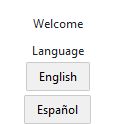
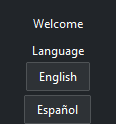
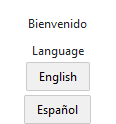
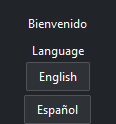
Pressing a language button re-translates every LocaleVar at once; the plain
L("Language") label, resolved when it was built, stays put — which is why
anything that must switch live is bound to a LocaleVar.