

Open a second window#
Task recipes for working with more than one window. For the mechanics behind them — focus, modality, stacking, and lifecycle — see Focus, modality & lifecycle in the Windows guide.
Note
Every extra window is a Toplevel; keep a single App/Window per
program (see Structuring an app). Toplevel’s first
positional argument is the title — pass the parent as master=.
Open a second window#
import ttkbootstrap as ttk

app = ttk.App(title="Main", size=(320, 200))

win = ttk.Toplevel(master=app, title="Details")
ttk.Label(win, text="A second window").pack(padx=20, pady=20)
It inherits the app’s theme and icon automatically.
Show a modal dialog that returns a value#
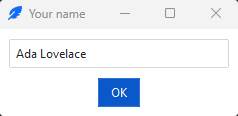
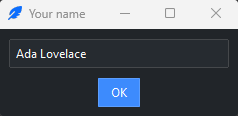
Make the window transient, grab input, and wait for it to close; read the result the dialog left behind:
def ask_name(parent):
    dialog = ttk.Toplevel(master=parent, title="Your name", transient=parent)

    name = ttk.StringVar()
    entry = ttk.Entry(dialog, textvariable=name)
    entry.pack(padx=10, pady=10, fill="x")

    result = {}
    def submit():
        result["name"] = name.get()
        dialog.destroy()
    ttk.Button(dialog, text="OK", command=submit,
               bootstyle="primary").pack(pady=(0, 10))

    dialog.place_window_center()
    entry.focus_set()              # put the cursor in the field
    dialog.grab_set()
    parent.wait_window(dialog)     # blocks until the dialog is destroyed
    return result.get("name")      # None if closed without OK

who = ask_name(app)
Tip
For text prompts, yes/no questions, and file or color pickers, use the shipped
dialogs (Querybox, Messagebox) instead of building your own — they are
already modal and return a value.
Reuse a window instead of rebuilding it#
To keep an expensive window around and show it again later, hide it rather than destroying it — and intercept ✕ so the user’s close hides it too:
def hide():
    win.withdraw()
    return False               # keep the window alive for next time

win.on_close(hide)             # ✕ now hides instead of destroying
win.deiconify()                # show it again later
That on_close is what makes the recipe work. Without it, ✕ destroys the
window for good and the next deiconify() raises TclError: bad window path
name.
See also
Focus, modality & lifecycle — the concepts.
Structuring an app — the single-root rule.
Show a splash screen — a borderless window shown while the app starts up.
Reference#
Toplevel — every constructor option and window method, including
on_closeandplace_window_center.