

Input validation#
ttkbootstrap ships a small validation framework for the text-entry widgets —
Entry, Spinbox, and Combobox. Attach a rule to a widget and a value
that fails it flags the widget with a danger-colored border until the
contents become valid again. This guide covers the ready-made rules, when they
fire, and writing your own.
The rules live on the Validation namespace, re-exported
at the top level — import it directly, or reach it as ttk.Validation:
from ttkbootstrap import Validation
The ready-made rules#
Each method takes the widget as its first argument and wires up a rule in one call:
Rule |
Passes when the contents are… |
|---|---|
|
alphabetic (or empty). |
|
numeric (or empty). |
|
a number within |
|
a match for the regular expression |
|
one of the values in |
|
a match for a common phone-number pattern. |
import ttkbootstrap as ttk
from ttkbootstrap import Validation

app = ttk.App()

age = ttk.Entry(app)
age.pack(padx=20, pady=20)
Validation.range(age, 0, 120)      # 0–120 accepted; anything else flags danger

app.mainloop()
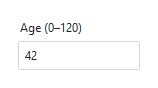
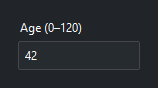
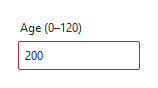
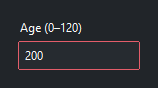
Note
The text, numeric, and range rules treat an empty field as valid, so an untouched entry is not flagged before the user types anything. Combine a rule with a “required field” check of your own if empty should fail.
When validation fires#
Every helper takes a when= argument that controls when the rule runs.
The default is "focusout" — validate when the widget loses focus, the least
intrusive choice:
|
Validates… |
|---|---|
|
when the widget loses focus (the default). |
|
when the widget gains focus. |
|
on both focus in and focus out. |
|
on every keystroke — live, as the user types. |
|
in all of the above situations. |
Validation.numeric(entry, when="key") # reject non-digits as they are typed
With when="key" the rule runs on each edit, so a rejected change keeps a bad
character from ever landing in the field; with "focusout" the value is
accepted into the widget but the widget is flagged until corrected.
Note
The danger border is the ttk invalid widget state, toggled
automatically from the rule’s result — so a validated widget reports
"invalid" in widget.state() while it holds a bad value. You can force
a check at any time (for example, before submitting a form) by calling
widget.validate(), which returns True or False.
Custom rules#
When no ready-made rule fits, write your own. A rule is a function that
receives a ValidationEvent and returns
True (valid) or False (invalid). Decorate it with @validator so it
receives the event object, then attach it with Validation.add:
from ttkbootstrap import Validation, validator

@validator
def is_even(event):
    text = event.postchangetext
    return text.isdigit() and int(text) % 2 == 0

Validation.add(entry, is_even, when="focusout")
The event’s most useful attribute is postchangetext — the value the widget
will hold if the change is allowed — along with widget (the widget being
validated). The full set (actioncode, insertdeletetext,
validationreason, …) is documented on
ValidationEvent.
Pass extra keyword arguments through Validation.add and they arrive at your
rule — the same mechanism the built-in Validation.range uses:
@validator
def max_length(event, limit):
    return len(event.postchangetext) <= limit

Validation.add(entry, max_length, when="key", limit=10)
Validating a form#
Rules flag fields as the user goes, but before you accept a form you want a
final check — including on fields the user never touched. widget.validate()
runs a widget’s rule on demand and returns True / False. Validate every
field first (so all bad ones light up, not just the first), then proceed only if
they all pass:
import ttkbootstrap as ttk
from ttkbootstrap import Validation, Messagebox

app = ttk.App()

name = ttk.Entry(app)
age = ttk.Entry(app)
for field in (name, age):
    field.pack(padx=20, pady=5)
Validation.text(name)
Validation.range(age, 0, 120)

def submit():
    results = [field.validate() for field in (name, age)]   # check all, flag all
    if all(results):
        save(name.get(), age.get())
    else:
        Messagebox.show_warning("Please fix the highlighted fields.", parent=app)

ttk.Button(app, text="Submit", command=submit, bootstyle="success").pack(pady=10)

app.mainloop()
Building the list before the all check matters: all(field.validate() …)
as a generator would short-circuit at the first failure and leave later invalid
fields unflagged.
Note
The text, numeric, and range rules pass on an empty field, so
validate() returns True for such a field left blank — add your own
emptiness check in submit (if not name.get(): …) when a field is
mandatory. (regex, options, and phonenumber instead fail an empty
field.)